Patching 19.3 to 19.16 step by step
Документ - Patching 19.docx
https://ocptechnology.com/patching-in-19c/
Posted on January 15, 2023January 18, 2023 by Shripal
In this article, we are going to learn how to apply patching from 19.3 to 19.16 step by step. Today we applying patch number 34133642 on the Linux platform.
Note:Before applying the patch make sure the below point should be clear.
Table of Contents
To update the OPATCH version we need to download it first and then replace it with the existing OPATCH in ORACLE HOME. Follow the steps in the below screenshot.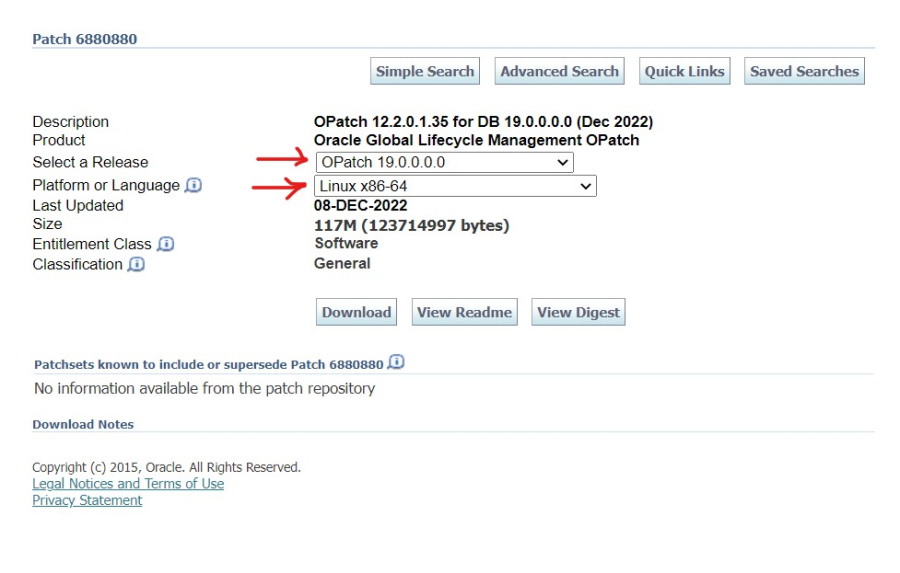
To upgrade Oracle 19.3 to 19.16 we need the following patch number 34133642.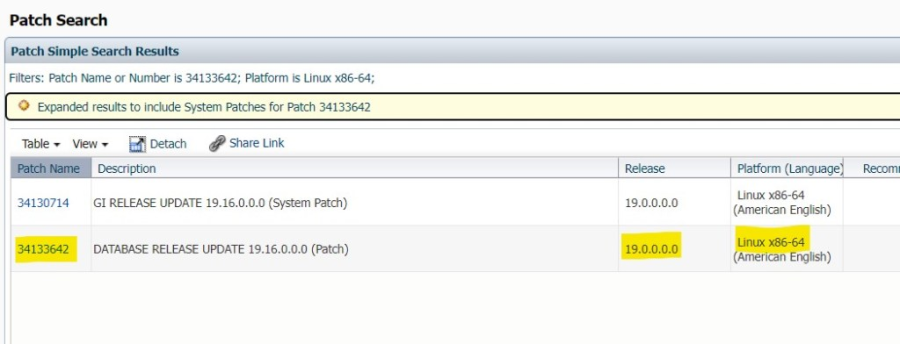
After downloading the OPATCH and PATCH copy both files to the Database server. In my case, I have copied both files to /u02 mount point.
Update the OPATCH utility version using the following commands. Make sure before upgrading the opatch utility you must take its backup.
Note:Before updating the OPATCH version, you should check the current version of OPATCH.
$cd $ORACLE_HOME/OPatch
$./opatch version
OPatch Version: 12.2.0.1.17
OPatch succeeded.
In my case the OPATCH version is 12.2.o.1.17 and we need the minimum OPATCH version to be 12.2.0.1.30.
$ cd $ORACLE_HOME/
$mv OPatch OPatch_bkp
Upgrade the OPATCH utility, just unzip the newly downloaded opatch utility version in ORACLE_HOME directly.
$unzip /u02/p6880880_190000_Linux-x86-64 -d $ORACLE_HOME/
Once the above command is completed then check the OPATCH version again.
$ ./opatch version
OPatch Version: 12.2.0.1.35
OPatch succeeded.
This time you can see the OPATCH version successfully updating.
Using the below command verify the current version details and some other information related to the database.
SQL> select BANNER_FULL from v$version;
BANNER_FULL
--------------------------------------------------------------------------------
Oracle Database 19c Enterprise Edition Release 19.0.0.0.0 - Production
Version 19.3.0.0.0
Registry verification is an important part of the patching activity.
SQL>col comp_id for a10
SQL>col version for a11
SQL>col status for a10
SQL>col comp_name for a37
SQL>select comp_id,comp_name,version,status from dba_registry;
COMP_ID COMP_NAME VERSION STATUS
---------- ------------------------------------- ----------- ----------
CATALOG Oracle Database Catalog Views 19.0.0.0.0 VALID
CATPROC Oracle Database Packages and Types 19.0.0.0.0 VALID
RAC Oracle Real Application Clusters 19.0.0.0.0 OPTION OFF
JAVAVM JServer JAVA Virtual Machine 19.0.0.0.0 VALID
XML Oracle XDK 19.0.0.0.0 VALID
CATJAVA Oracle Database Java Packages 19.0.0.0.0 VALID
APS OLAP Analytic Workspace 19.0.0.0.0 VALID
XDB Oracle XML Database 19.0.0.0.0 VALID
OWM Oracle Workspace Manager 19.0.0.0.0 VALID
CONTEXT Oracle Text 19.0.0.0.0 VALID
ORDIM Oracle Multimedia 19.0.0.0.0 VALID
SDO Spatial 19.0.0.0.0 VALID
XOQ Oracle OLAP API 19.0.0.0.0 VALID
OLS Oracle Label Security 19.0.0.0.0 VALID
DV Oracle Database Vault 19.0.0.0.0 VALID
15 rows selected.
Due to any type of error if patching got failed, then you must have a backup plan.
$cd $ORACLE_HOME
$tar -cvf oracle_home_15jan2023.tar $ORACLE_HOME
Let's start the preparation for applying the patch. Unzip the path in the /u02 directory using the following commands.
$unzip /u02/p34133642_19.16.00_Linux-x86-64.zip -d /u02
Note:Yes, check the prerequisites before applying the patch using the following command.
$cd /u02/34133642
$ $ORACLE_HOME/OPatch/opatch prereq CheckConflictAgainstOHWithDetail -ph ./
Output from the above query, if everything is fine.
Oracle Interim Patch Installer version 12.2.0.1.35
Copyright (c) 2023, Oracle Corporation. All rights reserved.
PREREQ session
Oracle Home : /u02/app/oracle/product/19.3.0/db_home
Central Inventory : /u01/app/oraInventory
from : /u02/app/oracle/product/19.3.0/db_home/oraInst.loc
OPatch version : 12.2.0.1.35
OUI version : 12.2.0.7.0
Log file location : /u02/app/oracle/product/19.3.0/db_home/cfgtoollogs/opatch/opatch2023-01-12_23-58-36PM_1.log
Invoking prereq "checkconflictagainstohwithdetail"
Prereq "checkConflictAgainstOHWithDetail" passed.
OPatch succeeded.
Check how many instances & listener is running on the machine.
$ ps -ef|grep pmon
oracle 3027 30927 0 00:00 pts/3 00:00:00 grep --color=auto pmon
oracle 3376 1 0 Jan12 ? 00:00:01 ora_pmon_orcl
Check the Listener status.
$ ps -ef|grep tns
root 14 2 0 Jan12 ? 00:00:00 \[netns\] |
oracle 3035 30927 0 00:00 pts/3 00:00:00 grep --color=auto tns
oracle 6197 1 0 Jan12 ? 00:00:01 /u02/app/oracle/product/19.3.0/db_home/bin/tnslsnr LISTENER -inherit
On my machine, one instance and one listener are currently running, letting down both services.
$ lsnrctl stop LISTENER
LSNRCTL for Linux: Version 19.0.0.0.0 - Production on 13-JAN-2023 00:00:55
Copyright (c) 1991, 2019, Oracle. All rights reserved.
Connecting to (DESCRIPTION=(ADDRESS=(PROTOCOL=TCP)(HOST=noida)(PORT=1521)))
TNS-12543: TNS:destination host unreachable
TNS-12560: TNS:protocol adapter error
TNS-00513: Destination host unreachable
Linux Error: 113: No route to host
Shutdown Database (PDB & cdb both)
SQL> show pdbs
CON_ID CON_NAME OPEN MODE RESTRICTED
---------- ------------------------------ ---------- ----------
2 PDB$SEED READ ONLY YES
3 PDB MOUNTED
SQL>shut immediate
Using the following command applies the patch.
Note:Make sure 7 GB of disk space is free in your binary location otherwise the patch will be failed.
$cd /u02/34133642
34133642]$ORACLE_HOME/OPatch/opatch apply
Patching component oracle.precomp.common, 19.0.0.0.0...
Patching component oracle.precomp.lang, 19.0.0.0.0...
Patching component oracle.jdk, 1.8.0.201.0...
Patch 34133642 successfully applied.
Sub-set patch \[29517242\] has become inactive due to the application of a super-set patch \[34133642\]. |
Please refer to Doc ID 2161861.1 for any possible further required actions.
Log file location: /u02/app/oracle/product/19.3.0/db_home/cfgtoollogs/opatch/opatch2023-01-13_00-09-07AM_1.log
OPatch succeeded.
Once opatch apply successfully, then start all the database services.
Start Listener
$ lsnrctl start LISTENER
Start Database
$ sqlplus / as sysdba
SQL*Plus: Release 19.0.0.0.0 - Production on Fri Jan 13 00:33:15 2023
Version 19.16.0.0.0
Copyright (c) 1982, 2022, Oracle. All rights reserved.
Connected to an idle instance.
SQL> startup
ORACLE instance started.
Total System Global Area 2466250360 bytes
Fixed Size 9137784 bytes
Variable Size 570425344 bytes
Database Buffers 1879048192 bytes
Redo Buffers 7639040 bytes
Database mounted.
Database opened.
SQL> show pdbs
CON_ID CON_NAME OPEN MODE RESTRICTED
---------- ------------------------------ ---------- ----------
2 PDB$SEED READ ONLY YES
3 PDB MOUNTED
SQL> alter session set container=PDB;
Session altered.
SQL> ALTER DATABASE OPEN;
Database altered.
SQL> SHOW PDBS
CON_ID CON_NAME OPEN MODE RESTRICTED
---------- ------------------------------ ---------- ----------
3 PDB READ WRITE YES
Now it's time to run datapatch -verbose which updates the patch information at the database binary & dictionary level as well as binary files.
34133642]$ cd $ORACLE_HOME/OPatch
OPatch]$ ./datapatch -verbose
Once datapatch -verbose is completed then execute the utlrp script to validate the invalid objects.
SQL> @?/rdbms/admin/utlrp.sql
Session altered.
Check applied patch details using lsinventory command.
OPatch]$ ./opatch lsinventory
Oracle Interim Patch Installer version 12.2.0.1.35
Copyright (c) 2023, Oracle Corporation. All rights reserved.
Oracle Home : /u02/app/oracle/product/19.3.0/db_home
Central Inventory : /u01/app/oraInventory
from : /u02/app/oracle/product/19.3.0/db_home/oraInst.loc
OPatch version : 12.2.0.1.35
OUI version : 12.2.0.7.0
Log file location : /u02/app/oracle/product/19.3.0/db_home/cfgtoollogs/opatch/opatch2023-01-13_07-35-21AM_1.log
Lsinventory Output file location : /u02/app/oracle/product/19.3.0/db_home/cfgtoollogs/opatch/lsinv/lsinventory2023-01-13_07-35-21AM.txt
--------------------------------------------------------------------------------
Local Machine Information::
Hostname: noida
ARU platform id: 226
ARU platform description:: Linux x86-64
Installed Top-level Products (1):
Oracle Database 19c 19.0.0.0.0
There are 1 products installed in this Oracle Home.
Interim patches (2) :
Patch 34133642 : applied on Fri Jan 13 00:17:16 IST 2023
Unique Patch ID: 24865470
Patch description: "Database Release Update : 19.16.0.0.220719 (34133642)"
Created on 14 Jul 2022, 16:09:56 hrs UTC
Bugs fixed:
SQL> select patch_uid,patch_id,SOURCE_VERSION, TARGET_VERSION, action, status,action_time,description from dba_registry_sqlpatch;
SQL>COLUMN object_name FORMAT A30
SQL>SELECT owner,object_type,object_name,status FROM dba_objects
WHERE status = 'INVALID'
ORDER BY owner, object_type, object_name;
no rows selected
SQL>col comp_id for a10
SQL>col version for a11
SQL>col status for a10
SQL>col comp_name for a37
SQL>select comp_id,comp_name,version,status from dba_registry;
COMP_ID COMP_NAME VERSION STATUS
---------- ------------------------------------- ----------- ----------
CATALOG Oracle Database Catalog Views 19.0.0.0.0 VALID
CATPROC Oracle Database Packages and Types 19.0.0.0.0 VALID
RAC Oracle Real Application Clusters 19.0.0.0.0 OPTION OFF
JAVAVM JServer JAVA Virtual Machine 19.0.0.0.0 VALID
XML Oracle XDK 19.0.0.0.0 VALID
CATJAVA Oracle Database Java Packages 19.0.0.0.0 VALID
APS OLAP Analytic Workspace 19.0.0.0.0 VALID
XDB Oracle XML Database 19.0.0.0.0 VALID
OWM Oracle Workspace Manager 19.0.0.0.0 VALID
CONTEXT Oracle Text 19.0.0.0.0 VALID
ORDIM Oracle Multimedia 19.0.0.0.0 VALID
SDO Spatial 19.0.0.0.0 VALID
XOQ Oracle OLAP API 19.0.0.0.0 VALID
OLS Oracle Label Security 19.0.0.0.0 VALID
DV Oracle Database Vault 19.0.0.0.0 VALID
15 rows selected.
What are the prerequisites for patching?
Prerequisites for patching take Opatch backup & ORACLE HOME along with full database backup.
Posted in ORACLETagged oracle 19c patching, Patching 19.3 to 19.16, upgrade 19.3 to 19.16
Previous: ORA-16019: Cannot Use Db_recovery_file_dest With LOG_ARCHIVE_DEST Or LOG_ARCHIVE_DUPLEX_DEST
Next: Oracle 19c Dataguard setup with PDB